Idle Music Star Tycoon Games Ver. 1.01.00 MOD MENU APK | Add Currency, Buy IAP-Items, Speed, No Ads


Needs OBB: No
Needs Root: No
Architecture: arm64
Immerse yourself in the excitement of music management and become the maestro of Idle Music Star!
*MOD Features*
- Add Cash - 100k
- Add Diamonds - 50k
- Add Gold - 10k
- Buy No Ads Pack
- Buy Weekly Pack
- Buy Growth Fund Pack
- Buy Tour Fund Pack
- Buy Season Pass
- Buy Managers & Assistants
Note: 2 out of all Managers & Assistants will not be unlocked cuz they're picky as hell..
*How to install (click the spoilers to read)*
Regarding login methods, please note that logging in with Google will not be possible when using signed MODs. Facebook login (if available) is possible, but it requires you to remove the Facebook application from your device. Other game-specific login methods (if available), such as email, transfer code or guest login usually work fine.
Notes:
- If you used our MOD APK before and just want to update, you can install the new MOD APK on top of the old without removing the game/app first.- In-App purchases are not possible on signed APKs as they require Google services similar to the Google login process.
Note:
For the case the unsigned APK does fail to install: Your device patch is not done correctly!Login methods and In-App purchases on unsigned MODs function the same as in the original game. Logging in with Google works without issues. Keeping the Facebook application installed is also no problem.
You are rooted and want to know how to patch your device? Please check this for more information:[Videotutorial] How To Login With Google+ Or Facebook App On Modded Games
Free Download:
Tutorials:
How to sign up and download on Platinmods.com
List of useful tutorials about how to use this website and its content

Click on the in-game "Store" Button, which is on the bottom left side -> switch to the pack or Assistant/Manager tab and click on any button in the mod menu. Then you will see a green shopping cart with a tick symbol meaning you "bought" the product. You can freely use/obtain the rewards now.I cannot get what you mean. How do i do it?
Device : vivo x60
Kind of done. Thank so much!Click on the in-game "Store" Button, which is on the bottom left side -> switch to the pack or Assistant/Manager tab and click on any button in the mod menu. Then you will see a green shopping cart with a tick symbol meaning you "bought" the product. You can freely use/obtain the rewards now.
I still can’t use the purchase successfully!Click on the in-game "Store" Button, which is on the bottom left side -> switch to the pack or Assistant/Manager tab and click on any button in the mod menu. Then you will see a green shopping cart with a tick symbol meaning you "bought" the product. You can freely use/obtain the rewards now.
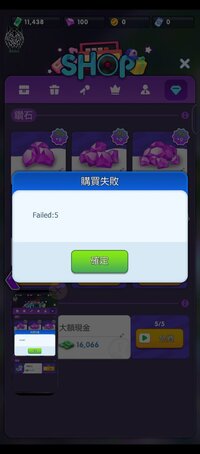
you dont have to click on the Item in the store page, you simply need to click on the button in the mod menu! Also, the diamonds packs are not included as you can readI still can’t use the purchase successfully!
Sorry, maybe I am stupid and still can't use it successfully!you dont have to click on the Item in the store page, you simply need to click on the button in the mod menu! Also, the diamonds packs are not included as you can read

No comments:
Post a Comment